Autopilot Blog Blueprint: How to Auto Publish Blog Posts with Minimal Setup
What auto publish blog posts means in practice
Auto publishing blog posts refers to a carefully designed workflow where content is generated, reviewed, formatted, and released to a CMS on a predefined schedule without manual uploads. It combines AI writing capabilities, editorial checks, and publishing hooks that push content live with minimal human intervention. The result is consistent publishing cadence, brand-aligned voice, and scalable content production that fits busy teams and multi-brand ecosystems.
For organizations that publish across multiple sites or brands, auto publishing also involves centralized controls for internal linking, canonical URLs, structured data, and social distribution. The goal is not to remove humans from the writing process, but to streamline repetitive steps so editors can focus on quality, strategy, and alignment with business goals. In short, you get faster time-to-publish without sacrificing quality or brand integrity.
Core workflow architecture for autopilot publishing
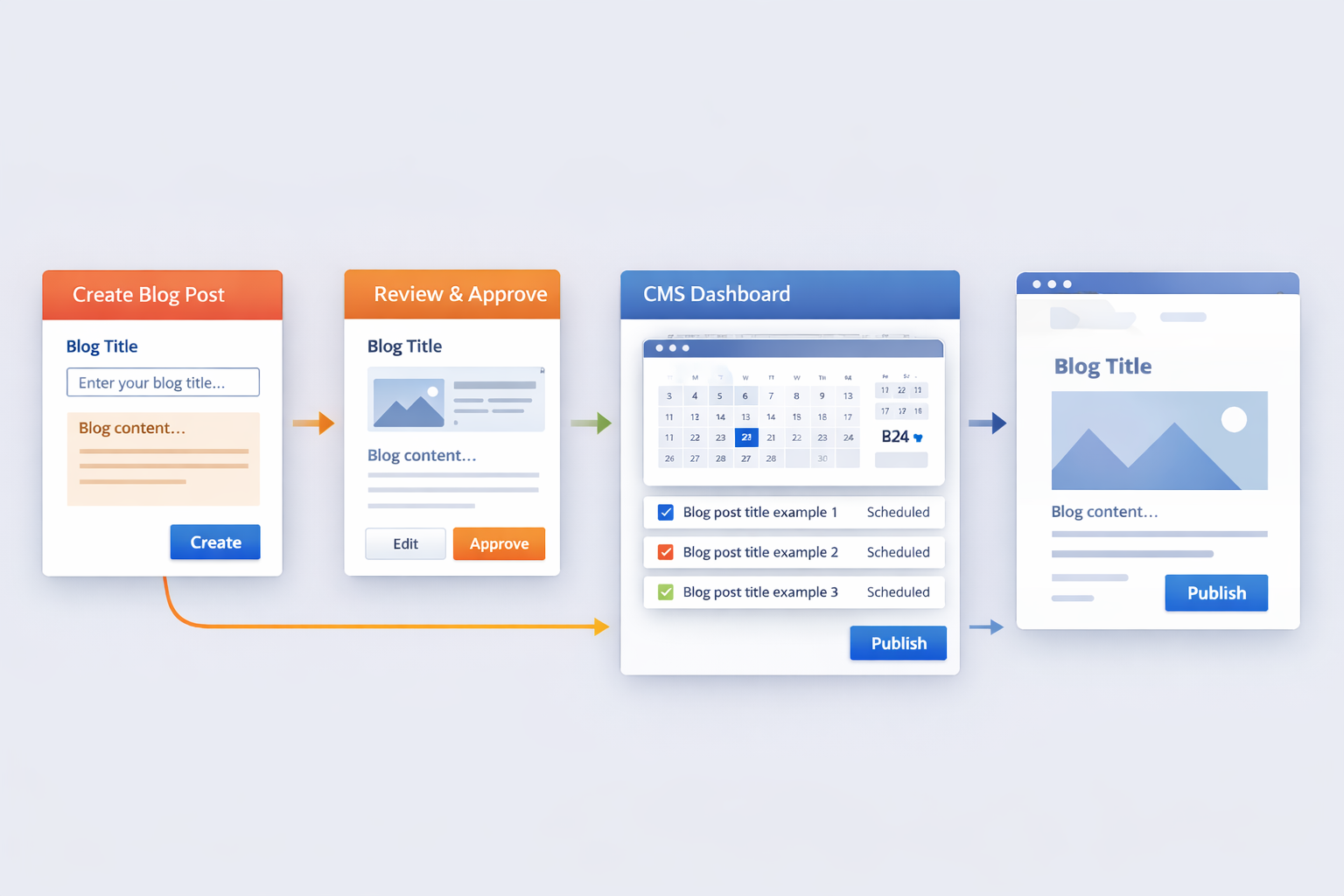
A robust autopilot publishing workflow has four core phases: creation, review, scheduling, and distribution. Each phase has guardrails to maintain accuracy, relevance, and brand consistency.
1) Content creation options
AI-generated drafts form the backbone of the creation phase. Teams can start from topic briefs, keyword clusters, and intent signals to produce long-form articles, summaries, or repurposed content. Prompt templates guide tone, structure, and factual expectations. For example, prompts can request an engaging introduction, a structured outline, and a conclusion with internal links to related posts.
Human inputs remain essential for complex topics, data-heavy claims, and brand voice calibration. A practical approach blends AI drafting with a paid editor pass, ensuring accuracy and stylistic consistency before publication.
2) Review and quality gates
The review phase enforces quality gates such as originality checks, factual verification, and brand voice adherence. Editors can approve, request revisions, or trigger alternate prompts for re-generation. A simple model is: AI draft → editorial polish → SEO checks → final approval.
Automation can handle metadata generation, alt text for images, and schema markup insertion, but human oversight helps catch nuance and ensure compliance with editorial standards.
3) Scheduling and publishing
Scheduling determines when posts go live based on audience behavior, campaign calendars, and workload balance. Publishing hooks push content to the CMS, apply templates, and set canonical URLs. If your site supports multi-brand publishing, routing rules ensure the right brand voice and SEO framework are applied automatically for each site.
Consider escape hatches for time-sensitive content. A quick override should allow a manual publish or reschedule if external events require immediate coverage.
4) Distribution and follow-up
Distribution spans the CMS, social channels, email newsletters, and any content hub. Automated posts can trigger social snippets, thumbnails, and cross-posting. A feedback loop analyzes engagement metrics to refine future prompts and editorial blocks.
CMS integration: connectors and strategies
Successful auto publish relies on sturdy CMS integration. The most common targets include WordPress, Webflow, Shopify, and other modern CMS platforms. Key considerations are API reliability, field mapping, and the ability to apply brand templates consistently across posts.
1) WordPress and beyond
For WordPress, an API-driven connector can create posts with structured content blocks, assign categories, set featured images, and attach internal links automatically. For other platforms, you may rely on Webhooks, headless CMS endpoints, or native plugins to reach parity with WordPress capabilities.
2) Multi-brand and multi-site orchestration
In agency or enterprise contexts, you’ll benefit from a single control plane that can publish across multiple brands or domains. This reduces cognitive load and ensures consistent taxonomy, schema, and internal linking patterns across sites.
3) Practical integration checklist
- Define a stable content schema that maps AI outputs to CMS fields.
- Configure automated image handling and alt text injection.
- Set up canonical URLs and internal linking templates.
- Enable metadata and schema markup automation for SEO signals.
- Test end-to-end publishing on a staging environment before going live.
Maintaining brand voice and quality with AI content
AI can accelerate content production, but quality control secures trust and consistency. The secret sauce is a disciplined mix of prompts, style guides, and editorial oversight.
1) Prompt design that reflects your brand
Prompts should specify audience, tone, voice, and preferred structure. Include constraints such as sentence length, preferred verbs, and required sections. Over time, you’ll develop a library of prompts tuned to different topics or formats (how-tos, listicles, case studies).
2) Style guides and brand templates
Stock prompts alone aren’t enough. A living style guide ensures terminology, capitalization, and brand phrases stay consistent. Template blocks for intros, conclusions, and call-to-action hooks help maintain uniformity across posts.
3) Editorial checks and human oversight
Schedule a human review at least for the first 10–15 posts in a new topic area. Over time, automation learns from reviewer feedback and improves accuracy. Regularly audit for data accuracy, claims, and compliance with editorial standards.
SEO and structure automation at scale
Automation for SEO means more than keyword stuffing. It’s about structured data, internal linking, and page-level signals that help search engines understand and rank content. A scalable approach includes metadata generation, schema markup, and a governance model for linking strategies.
1) Internal linking at scale
Automated linking should reflect content taxonomy and topical authority. Use anchor-rich templates that insert relevant links to pillar pages and related articles, enhancing crawlability without clutter.
2) Structured data and canonical management
Automatic schema markup helps search engines interpret content snippets. Maintain a canonical URL strategy to prevent duplicate content issues when cross-posting or syndicating across sites.
3) Metadata and on-page signals
Meta titles, descriptions, and headers should be generated with intent alignment and keyword relevance in mind. Avoid over-optimization; prefer semantic relevance and user experience as the guiding principles.
Practical setup checklist
- Clearly define target audiences, topics, and posting cadence for each brand or site.
- Assemble a robust prompt library and brand style guide for AI content creation.
- Choose a CMS integration strategy (API-based connector, webhooks, or plugin) and test in a staging environment.
- Configure editorial gates: AI draft → editor pass → SEO checks → publish.
- Set up metadata templates and schema blocks.
-
- Enable canonical URL rules and internal linking templates.
- Automate image handling: alt text, captions, and compression for performance.
- Set up cross-channel distribution rules for social snippets and email previews.
- Implement monitoring dashboards to track posting cadence, approval times, and publish success rates.
- Run a pilot with a controlled topic set before expanding to a full catalog.
Pitfalls and best practices
- Avoid relying solely on AI for accuracy. Always fact-check data-heavy content.
- Guard against content drift by periodically refreshing prompts and style guidelines.
- Balance automation with human editorial oversight to preserve trust and authority.
Measuring success and ROI
Key metrics include time-to-publish, publish frequency, on-page engagement, and organic traffic growth. Track changes in average session duration, bounce rate, and scroll depth to gauge content quality. For ROI, compare pre- and post-automation publishing cycles, factoring in editor time saved and incremental traffic from higher search visibility.
Establish a simple dashboard that correlates publishing velocity with ranking improvements for target keywords. Over a quarter, you should see a clearer signal of how automation affects organic growth beyond vanity metrics.
Advanced topics: multilingual and cross-channel publishing
Global brands benefit from multilingual automation that respects local intent and language nuances. Structure content planning around language-specific topics, regional formats, and cultural relevance. Cross-channel publishing ensures that the same core article is adapted for social, email, and other channels without losing coherence.
Maintain a centralized content calendar and a translation workflow that preserves voice while scaling across markets. Regular audits of localized pages help maintain parity in quality and performance.
FAQ and troubleshooting
Q: Can automation replace editors entirely?
A: No. Automation speeds up the process, but a human editor remains essential for quality, accuracy, and brand alignment. Use editors to handle edge cases and data-heavy topics.
Q: How do I start with a minimal setup?
A: Begin with a pilot on one brand or site, implement a narrow topic scope, and gradually expand as you refine prompts, templates, and editorial gates.
Q: What about data privacy and compliance?
A: Ensure prompts do not leak sensitive information, and enforce review gates for regulated topics. Use secure integrations and access controls to protect data integrity.
Legal and policy notes: Disclaimer and Terms and Conditions. For additional policies, refer to Disclaimer.